
免费建立商铺,与百万浙商做生意!
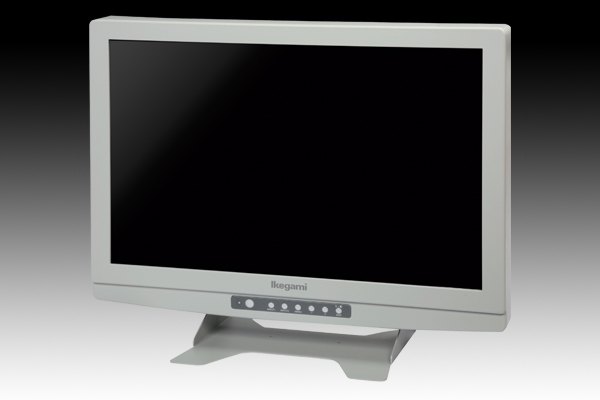

<pclass="msonormal"style="text-indent:0pt"> <h3style="font-family:microsoftyahei,微软雅黑,tohoma,arial,helvetica,sans-seriffont-size:1emcolor:#022044background-color:#eaeaea"> MLW-2624C<pstyle="color:#333333font-family:microsoftyahei,微软雅黑,tohoma,arial,helvetica,sans-seriffont-size:1embackground-color:#ffffff"> 超精细:1920(H)×1080(V)(WUXGA)<br /> <br /> 全彩色:1677万色(8比特×3色)<br /> <br /> 最高亮度:450cd/m2 <p> <br /> </p> <h3style="font-family:microsoftyahei,微软雅黑,tohoma,arial,helvetica,sans-seriffont-size:1emcolor:#022044background-color:#eaeaea"> 宽色域<pstyle="color:#333333font-family:microsoftyahei,微软雅黑,tohoma,arial,helvetica,sans-seriffont-size:1embackground-color:#ffffff"> 成功满足了医疗领域所追求的红色系宽色域和忠实的色彩还原。 <p> <br /> </p> <h3style="font-family:microsoftyahei,微软雅黑,tohoma,arial,helvetica,sans-seriffont-size:1emcolor:#022044background-color:#eaeaea"> 使用LED背光面板的10比特IPS液晶屏<pstyle="color:#333333font-family:microsoftyahei,微软雅黑,tohoma,arial,helvetica,sans-seriffont-size:1embackground-color:#ffffff"> 高亮度?高对比度的水平取像(IPS技术)液晶面板实现了上下?左右达178°液晶显示的最高标准的超广角性能。而LED背光面板也大大有助于节省功耗(池上以往机型的50%)。 <p> <br /> </p> <pstyle="color:#333333font-family:microsoftyahei,微软雅黑,tohoma,arial,helvetica,sans-seriffont-size:1embackground-color:#ffffff"> 采用12比特信号处理和10比特液晶显示屏,进一步提高了平滑的色彩层次表现。 <p> <br /> </p> <h3style="font-family:microsoftyahei,微软雅黑,tohoma,arial,helvetica,sans-seriffont-size:1emcolor:#022044background-color:#eaeaea"> 多画面显示<pstyle="color:#333333font-family:microsoftyahei,微软雅黑,tohoma,arial,helvetica,sans-seriffont-size:1embackground-color:#ffffff"> 两种输入视频可同时显示,分别为两分割画面的画外画形式及主画面中显示副画面的画中画形式,在一台监视器上同时对两个画面进行确认,节省空间。<br /> <br /> HD-SDI、DVI、模拟Component、S-VIDEO、Composite(VBS)信号的2画面显示。 <p> <br /> </p> <h3style="font-family:microsoftyahei,微软雅黑,tohoma,arial,helvetica,sans-seriffont-size:1emcolor:#022044background-color:#eaeaea"> 功能键<pstyle="color:#333333font-family:microsoftyahei,微软雅黑,tohoma,arial,helvetica,sans-seriffont-size:1embackground-color:#ffffff"> 将频繁使用的功能设置到功能键,可瞬间启动其相对应的功能 <p> <br /> </p> <h3style="font-family:microsoftyahei,微软雅黑,tohoma,arial,helvetica,sans-seriffont-size:1emcolor:#022044background-color:#eaeaea"> 触摸键设计<pstyle="color:#333333font-family:microsoftyahei,微软雅黑,tohoma,arial,helvetica,sans-seriffont-size:1embackground-color:#ffffff"> 采用触摸键设计大大提高了操作的便利性。 <p> <br /> </p> <h3style="font-family:microsoftyahei,微软雅黑,tohoma,arial,helvetica,sans-seriffont-size:1emcolor:#022044background-color:#eaeaea"> 上下左右翻转功能<pstyle="color:#333333font-family:microsoftyahei,微软雅黑,tohoma,arial,helvetica,sans-seriffont-size:1embackground-color:#ffffff"> 支持图像上下左右翻转显示。 <p> <br /> </p> <h3style="font-family:microsoftyahei,微软雅黑,tohoma,arial,helvetica,sans-seriffont-size:1emcolor:#022044background-color:#eaeaea"> 对比度自动调整功能<pstyle="color:#333333font-family:microsoftyahei,微软雅黑,tohoma,arial,helvetica,sans-seriffont-size:1embackground-color:#ffffff"> 计算整个画面的亮度、实时扩展调整白色与黑色的动态范围,实现了更真实的黑色还原和高对比度的图像画面。 <p> <br /> </p> <h3style="font-family:microsoftyahei,微软雅黑,tohoma,arial,helvetica,sans-seriffont-size:1emcolor:#022044background-color:#eaeaea"> 对应多路输入信号<pstyle="color:#333333font-family:microsoftyahei,微软雅黑,tohoma,arial,helvetica,sans-seriffont-size:1embackground-color:#ffffff"> 对应高清信号(RGB/组件)、NTSC/PAL信号(复合/Y/C)、PC输入(模拟RGB/数字DVI-D),且对应SD/HD-SDI。 <p> <br /> </p> <h3style="font-family:microsoftyahei,微软雅黑,tohoma,arial,helvetica,sans-seriffont-size:1emcolor:#022044background-color:#eaeaea"> 抓取静止图像功能<pstyle="color:#333333font-family:microsoftyahei,微软雅黑,tohoma,arial,helvetica,sans-seriffont-size:13pxbackground-color:#ffffff"> 通过对前面板热键的设置,可实现画面的静止。此外,切换视频和静止图像可进行画面比较。 <p> <br /> </p> <p> <br /> </p> </pstyle="color:#333333font-family:microsoftyahei,微软雅黑,tohoma,arial,helvetica,sans-seriffont-size:13pxbackground-color:#ffffff"></h3style="font-family:microsoftyahei,微软雅黑,tohoma,arial,helvetica,sans-seriffont-size:1emcolor:#022044background-color:#eaeaea"></pstyle="color:#333333font-family:microsoftyahei,微软雅黑,tohoma,arial,helvetica,sans-seriffont-size:1embackground-color:#ffffff"></h3style="font-family:microsoftyahei,微软雅黑,tohoma,arial,helvetica,sans-seriffont-size:1emcolor:#022044background-color:#eaeaea"></pstyle="color:#333333font-family:microsoftyahei,微软雅黑,tohoma,arial,helvetica,sans-seriffont-size:1embackground-color:#ffffff"></h3style="font-family:microsoftyahei,微软雅黑,tohoma,arial,helvetica,sans-seriffont-size:1emcolor:#022044background-color:#eaeaea"></pstyle="color:#333333font-family:microsoftyahei,微软雅黑,tohoma,arial,helvetica,sans-seriffont-size:1embackground-color:#ffffff"></h3style="font-family:microsoftyahei,微软雅黑,tohoma,arial,helvetica,sans-seriffont-size:1emcolor:#022044background-color:#eaeaea"></pstyle="color:#333333font-family:microsoftyahei,微软雅黑,tohoma,arial,helvetica,sans-seriffont-size:1embackground-color:#ffffff"></h3style="font-family:microsoftyahei,微软雅黑,tohoma,arial,helvetica,sans-seriffont-size:1emcolor:#022044background-color:#eaeaea"></pstyle="color:#333333font-family:microsoftyahei,微软雅黑,tohoma,arial,helvetica,sans-seriffont-size:1embackground-color:#ffffff"></h3style="font-family:microsoftyahei,微软雅黑,tohoma,arial,helvetica,sans-seriffont-size:1emcolor:#022044background-color:#eaeaea"></pstyle="color:#333333font-family:microsoftyahei,微软雅黑,tohoma,arial,helvetica,sans-seriffont-size:1embackground-color:#ffffff"></h3style="font-family:microsoftyahei,微软雅黑,tohoma,arial,helvetica,sans-seriffont-size:1emcolor:#022044background-color:#eaeaea"></pstyle="color:#333333font-family:microsoftyahei,微软雅黑,tohoma,arial,helvetica,sans-seriffont-size:1embackground-color:#ffffff"></pstyle="color:#333333font-family:microsoftyahei,微软雅黑,tohoma,arial,helvetica,sans-seriffont-size:1embackground-color:#ffffff"></h3style="font-family:microsoftyahei,微软雅黑,tohoma,arial,helvetica,sans-seriffont-size:1emcolor:#022044background-color:#eaeaea"></pstyle="color:#333333font-family:microsoftyahei,微软雅黑,tohoma,arial,helvetica,sans-seriffont-size:1embackground-color:#ffffff"></h3style="font-family:microsoftyahei,微软雅黑,tohoma,arial,helvetica,sans-seriffont-size:1emcolor:#022044background-color:#eaeaea"></pstyle="color:#333333font-family:microsoftyahei,微软雅黑,tohoma,arial,helvetica,sans-seriffont-size:1embackground-color:#ffffff"></h3style="font-family:microsoftyahei,微软雅黑,tohoma,arial,helvetica,sans-seriffont-size:1emcolor:#022044background-color:#eaeaea"></pclass="msonormal"style="text-indent:0pt">
 浙江民营企业网 www.zj123.com 版权所有 2002-2010